1ère Etape : Préparation des photos pour les intégrer dans votre boutique d’ecommerce
Nous avons vu dans notre précédent billet : Comment optimiser les photos des fiches produits de votre ecommerce
qu’il était nécessaire de retravailler vos photos pour obtenir un chargement rapide des pages et qu’ainsi la navigation sur votre site soit plus fluide.
En effet même si maintenant la plupart des utilisateurs ont l’ADSL, il est impossible pour un de vos futurs acheteurs d’attendre plusieurs secondes avant l’affichage d’une des pages de votre site et je ne vous parle pas de vos clients n’ayant pas l’ADSL !
Nous allons donc voir comment retravailler vos images pour avoir un chargement de vos pages rapides en utilisant un très bon produit développé par Pierre-Emmanuel Gougelet : Xnview que vous pouvez télécharger ici. Ce produit est gratuit pour une utilisation non commerciale, sinon il vous en coûtera 26€ (à la date de ce billet).
Après avoir téléchargé et installé le produit, lancez le (je ne m’attarde pas sur l’installation du produit qui ne présente pas de difficultés particulières).
Allez dans le menu Outils -> Conversion multiples :
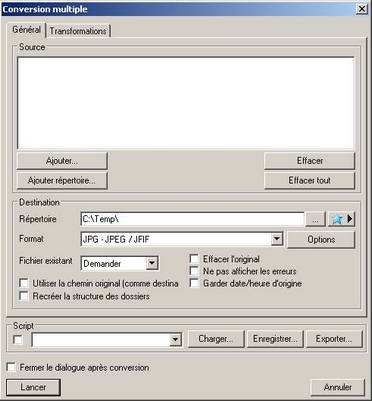
Dans Ajouter ou Ajouter répertoire, vous pouvez ajouter vos fichiers ou votre répertoire de photos à convertir.
Dans Répertoire indiquez le répertoire de destination de vos photos converties.
Dans Format, sélectionnez : JPG où JPEG / JFIF.
Cliquez sur le bouton Options et choisissez une qualité de 70 (ce qui vous permet d’obtenir un chargement rapide pour une qualité correcte de photo).
Cliquez sur l’onglet Transformations, choisissez Redimensionner dans Images et cliquez sur le bouton Ajouter :
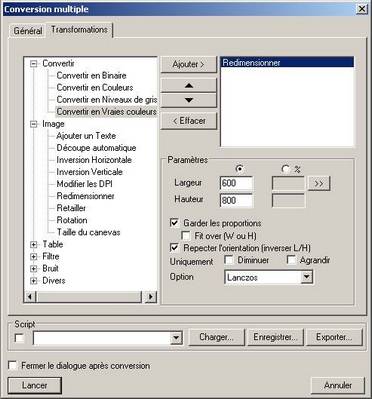
Indiquez dans Largeur et Hauteur les dimension maximales que vous souhaitez pour votre image en laissant coché : Garder les proportions. Le logiciel va choisir automatiquement la plus petite des 2 dimensions et adapter l’autre en gardant les proportions de l’image.
Ajouter ensuite Modifier les DPI et laisser les valeurs par défauts 72 x 72 qui sont largement suffisantes pour une image sur Internet, mais ce n’est pas indispensable.
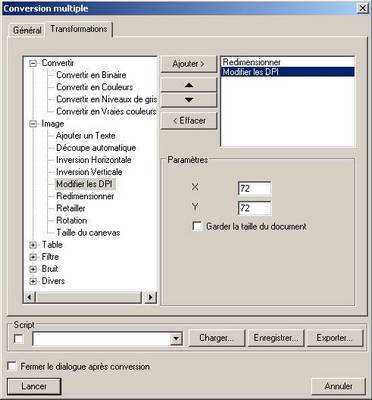
Vous n’avez plus ensuite qu’à cliquer sur Lancer pour récupérer vos images dans votre répertoire de destination.
Remarque pour les utilisateurs de Magento :
Si vous êtes un utilisateur de Magento et que vous souhaitez générez vos 3 photos dans le même dossier et donnez un nom différent à vos 3 tailles de photographies, je vous conseille d’utiliser l’autre option du menu Outils -> Conversion de Séquence :
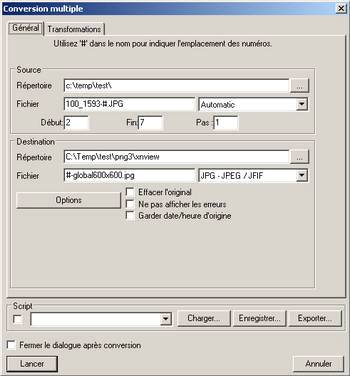
Qui va vous permettre de faire la même opération que pour la conversion multiple, mais en plus de lui rajouter un nom commun, comme ici global600x600.
Test du gain obtenu :
Pour vous donner une idée du gain que vous pouvez attendre de cette opération, nous allons faire un petit test. Prenons une photo d’un objet avec un appareil photo numérique, nous obtenons la photo ci-dessous :
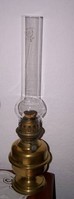
Nous avons une photo de 855 x 2304 pixels et une résolution de 230 dpi, ce qui nous donne un fichier avec une taille de 717 ko.
Après passage dans le système de conversion multiple de Xn-view, nous obtenons une image de 222 x 600 pixels et une résolution de 72 dpi, ce qui nous donne un fichier avec une taille de 14 ko. Je vous ais sélectionné une partie de la photo pour vous montrer que à l’affichage en grand de la photo vous ne verrez pas ou peux la différence.
Avant :
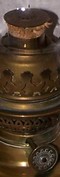
Après :

Vous voyez donc mieux le gain que vous pouvez obtenir, si vous effectuer cette opération pour toutes les photos de votre boutique.
Nous verrons dans notre prochain billet comment effectuer cette même opération avec un autre logiciel : The Gimp.