
Avoir une boutique performante, passe aussi par une vitrine qui se démarque des autres. Cet argument est encore plus valable dans le domaine de l’e-commerce. De plus si vous utilisez un système clef en main comme Prestashop ou Magento et que vous ne modifiez pas votre thème, vous risquez d’avoir le même que d’autres e-commerçants !
Nous allons donc vous montrer comment utiliser un autre thème dans Prestashop que celui par défaut et cela en quelques minutes ! En effet cette opération s’avère être très simple. Donc pourquoi ne pas se lancer ?
Le thème que nous allons utilisé est celui que propose un ami bloggueur : Matthieu Perinet, vous pouvez le télécharger sur son blog ou à partir de nos serveurs.
Installation des modules complémentaires :
La première chose à vérifier avant d’installer un thème est que vous possédiez bien les modules complémentaires. En effet la plupart en nécessite. Le thème que nous souhaitons installer en nécessite deux .
Si votre installation de Prestashop est propre et que vous n’avez pas modifié les modules de celle-ci, alors vous pouvez sauter cette étape, les modules nécessaires pour ce thème étant installé par défaut dans Prestashop.
Connectez vous dans votre partie administrateur, rendez vous dans l’onglet module, puis cherchez les deux modules suivants situés dans la partie « Blocks » :
-bloc logo de paiement
-bloc publicité
Vérifiez que chacun de ces modules soit bien installé (présence d’un logo positif vert devant les lignes).


Si ce n’est pas le cas cliquez sur le bouton « installer » devant ceux ci (vous pouvez aussi cocher les deux cases devant les lignes puis cliquez sur le bouton « installer la selection » en bas de page.
Si l’opération s’est correctement déroulée, vous devriez avoir un message de confirmation de la bonne installation de vos modules.

Si vous n’avez pas trouver les modules précédent dans la page indiquée, vous pouvez les télécharger ici.
Module 1
Module 2
Décompressez (en utilisant un logiciel comme 7-zip par exemple) alors ces modules dans le dossier « module » de votre répertoire Prestashop, puis recommencez l’étape 1.
Installation du thème :
Si vous ne l’avez pas encore fait, téléchargez le thème.
Une fois celui-ci téléchargé, vous n’avez qu’à décompressez l’archive (en utilisant un logiciel comme 7-zip par exemple) et le placer dans le dossier « themes » de votre installation Prestashop.
Activation du thème :
Rendez vous dans votre partie administration de Prestashop.
Allez dans l’onglet préférences, puis dans le sous-onglet « Apparence ».

En bas de page dans l’onglet Thèmes, vous devriez trouver un nouveau thème « muriper » au côté de celui par défaut de Prestashop.
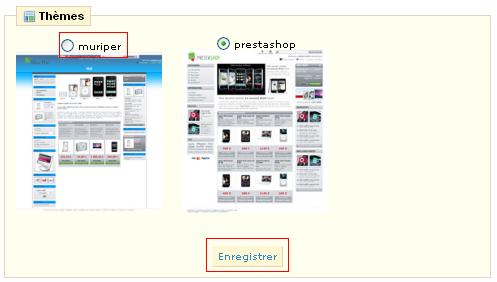
Il vous suffit alors de cocher le thème que vous souhaitez utiliser (ici muriper) puis de cliquer sur « Enregistrer », tout à fait au bas de la page.
Ensuite rendez vous dans la partie client de votre boutique, votre thème devrait alors avoir changé.
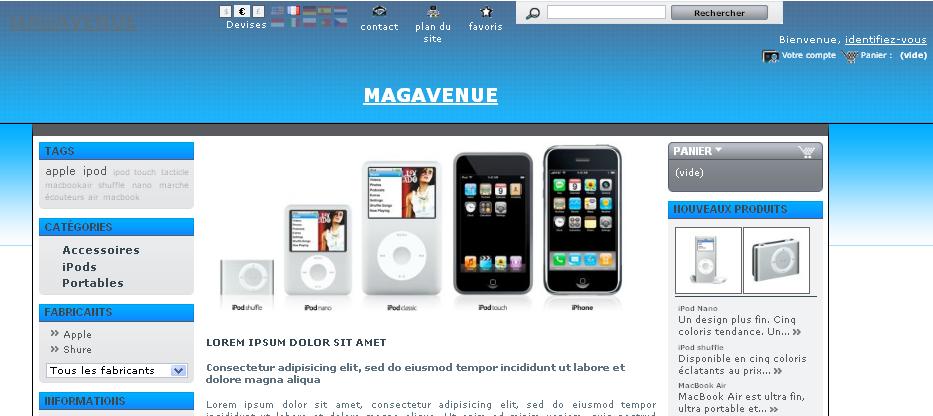
Récapitulatif pour l’installation d’un thème :
Assurez vous d’avoir tous les modules nécessaires au bon fonctionnement de celui-ci, si ce n’est pas le cas, téléchargez les et installez les.
Décompressez votre nouveau thème dans le dossier « themes » de votre installation puis activez le.
Notre équipe vous propose régulièrement de nouveaux thèmes dans notre boutique. Elle peut aussi s’occuper de la création de votre thème sur mesure, n’hésitez pas à nous contacter.


Je souhaite avoir un tutos pour modifier les styles nCSS???
Est ce que vous savez comment modifier le contenu:
Les menus, les conditions générales, les pages de transactions de paiement, …bref tout le contenu.
Merci d’avance pour ce blog.
Un tutoriel sur comment créer un thème n’est pas une chose évidente à faire. Tout dépend du niveau de chacun, et de ce que l’on souhaite faire…
Le mieux est d’étudier par soit même les différentes pages que vous souhaitez modifier en notant les sélecteurs css que vous repérez.
Ensuite rendez vous dans la feuille de style de votre thème et modifiez ces sélecteurs.
J’ai testé le nouveau thème Muriper. Mais seulement, je constate qu’il ne prend pas en charge le logo qui s’affiche pourtant dans le thème Prestashop. Il se contente juste d’écrire le nom donné à la boutique. Comment remédier à ce problème. Mercil
Bonjour Peter,
C’est étrange, il semble pourtant s’afficher dans notre cas.
Êtes vous sur que le logo est au bien présent..
Oui, le logo est bien présent. La preuve c’est que je n’ai pas de problème d’affichage du logo avec le thème Prestashop.
Quel est le chemin exact d’accès à votre logo ? Car apparemment celui à l’adresse :http://catalogue.daabou.com/boutique/img/logo.png n’est pas trouvé. essayer de le mettre dans un autre répertoiree, et changer le chemin d’accès dans le fichier header.tpl de votre thème
Je rencontre le même problème que Peter.
Le problème vient de l’extension du logo : mon logo se nomme logo.jpg mais dans le thème Muriper, c’est le fichier logo.png qui est appelé.
Après plusieurs essais (avec des jpg, gif et png), il semblerait que quelque soit le nom et le format du logo, PrestaShop convertit l’image en jpg et la renomme logo.jpg.
Une toute petite modification serait donc nécessaire dans le thème Muriper : remplacer logo.png par logo.jpg dans le fichier header.tpl
Bonsoir Vivi,
En effet l’extension n’est pas gérée, et le nom du fichier est en dur dans le template.
Pour le modifier, rendez vous dans le fichier header.tpl ligne 39 et remplacez logo.png par logo.jpg
Bonjour,
J’ai essayé le thème Muriper,
Mais j’ai un problème dont je ne comprend pas la provenance du problème. ( http://casse-noisettes.be/shop/product.php?id_product=12 )
Il n’affiche pas les catégories sur le volet droite.
Savez vous m’aidez ?
Avec le thème prestashop, il les affiche.
Merci d’avance
Nicolas
Bonjour Nico,
Ce problème ce passe avec la nouvelle version de Prestashop 1.1.
Pour le résoudre, ouvrez le fichier global.css contenu dans le thème.
Ensuite à la ligne 1191, modifiez :
div#categories_block_left ul.dhtml
display:none;
}
en
div#categories_block_left ul.dhtml {
display:block;
}
Génial, ca fonctionne très bien.
Merci
Et pour l’apprentissage, Pourquoi le faite de mettre block fait apparaitre le texte ?
La propriété block permet de définir comment un élément doit être affiché.
Ici l’élément est l’arbre de catégorie.
En mettant un display:none, on ordonne à l’arbre de catégorie de ne pas s’afficher.
En mettant display:block; on spécifie que l’élément est un bloc et celui-ci est affiché en tant que tel. (on pourrait aussi mettre table etc… pour un affichage différent.).
bonjour,
je suis encore en local (jai suivi votre tuto video) , et la je viens de faire le test pr le theme, j’ai donc mis dans le fichier theme de prestashop en local le fichier deziper muriper, et il n’apparait pas dans apparence !
pourriez vous m’aidez, j’ai aussi essayez d’installer un module et pareil le module n’apparait pas dans la liste des module a activer .
Merci de votre aide!
Dans le dossier que vous placez dans modules ou themes, y a t’il bien les fichiers à la racine, ou sont ils contenus encore dans un sous dossier ?
Si oui, il faut que le dossier que vous placez, contiennent directement tous les fichiers.
Sinon, cela peut être du à un problème d’autorisation des fichiers…
un grand merci vraiment , cela fonctionne effectivement le dossier avais un sous dossier ( pr le theme et aussi pr l’autre module) cela fait 48H que j’essais et je m’arrachais les cheveux, qd on pose ce genre de questions toutes simple sur le forum de presta , on est limite ignoré, merci vraiment d’etre la et d’avoir repondu a mon probleme!
Bonjour,
je suis en train de m’essayer à Prestashop en local.
J’ai mis en ligne un joomla! et j’ai réalisé son template avec Artisteer.
Est il possible d’utiliser un template Artisteer, si oui, je pense qu’il doit être constitué de 3 colonnes et un top menu au dessus de la bannière, si il y en a une?
Merci, par avance, de votre réponse.
Gilles.
@kelly : de rien 😉
@gilles : Non un thème Artisteer ne peut pas être utilisé pour Prestashop. Il faut des variables spéciales non gérées par Artisteer. Peut être plus tard !
Bonjour,
J’ai téléchargé le theme et est voulu l’essayer mais le problème est que l’on dirais que le css est absent.
mais ils y sont bien et dans le bon dossier.
Avez vous eu le problème ?
Merci pour votre aide
Une mauvaise configuration du fichier settings (si vous avez le même problème avec le thème par défaut). Sinon, vous avez peut être un dossier intermédiaire, entre les fichiers et le dossier du thème.
Bonjour,
Cela ne marche pas pour moi …c’est dommage, j’ai pourtant bien suivi a la lettre le tutorial..je suis en « Localhost »
une idee ?
Merci
Qu’est-ce que cela vous fait ?
Yes, même problème de CSS.
le css est absent pour ce nouveau thème prestashop et ou se trouve le fichier « settings »? sachant que le thème par défaut fonctionne très bien. merci de me répondre. cordialement.
Le thème est vieux de plus d’un an. Entre temps, Prestashop a changé son fonctionnement pour les thèmes mais pas pour l’installation.
Vous avez deux solutions : utiliser un thème plus récent, ou activer le mode de compatibilité Prestashop 1.1 dans les préférences.
Merci ca fonctionne nickel !
i love chenging theme
bonjour je voudfrai changer la couleur de mon site des blocks nouveaux produits, produits phare,tag,panier….ils sont actuellement gris mais je veux les mettres en rose…je ne sais pas quelle est la ligne du CSS global qu’il faut changer pour la couleur de ses elements???
merci
je voudrai aussi installer et creer un flux rss pour mon site http://www.modafemina.com mais je n’y arrive pas…quelles sont les pas a suivre pour creer mon flux rss correctement et le mettre sur mon front office ensuite…..
merci
J’ai suivi pas à pas les conseils: check des modules installés puis intégration du thème (avec le theme matrice de 2link) mais rien n’y fait… j’ai la carcasse du site qui s’affiche sans design.
C’est comme s’il ne le reconnaissait pas…
Je n’ai pas trouvé la « compatibilité » dans préférences quel est le sous onglet?
Merci d’avance
Pas simple cette histoire : mais pourquoi est-ce donc si compliqué ? Il n’y a aucune explication avec le thème que je viens d’acheter (pwaxius)
J’ai acheté un thème chez Prestashop que je ne peux pas installer.
1) Il n’est pas zippé, je l’ai téléchargé sur mon ordi
2) la procédure nous parle de blocks publicité et block logo de paiement, mais que viennent faire ces 2 trucs dans l’installation d’un thème ?
3) dans mon backoffice Modules-positions je les trouve bien mais il ne sont pas configurés.
Comment dois-je les configurer afin qu’ils soient valides ?
Ce qui n’est pas facile c’est se servir de Filezilla.
J’ai trouvé un tuto sur le forum de Prestashop, pour tous ceux qui veulent transférer un template :
http://www.planethoster.net/communaute/showthread.php?t=63&highlight=filezilla
il faut aussi avoir les bons identifiants et mots de passe, à savoir le mot de passe est celui que vous avez pour votre Cpanel, l’hote est en principe : http://ftp.votrenomdedomaine.extension
l’identifiant vous a été communiqué par votre hébergeur.
Filezilla c’est pas évident à s’en servir, mais moi qui suis une bille j’y suis arrivée, j’ai transféré le template, et j’ai pu le visualiser, sauf qu’il ne me plait plus…
Euhhh non je ne l’ai pas trouvé chez Prestashop mais chez PlanetHoster mon hébergeur…
sorry pour l’erreur…
J’ai suivi pas à pas les conseils: check des modules installés puis intégration du thème (avec le theme matrice de 2link) mais rien n’y fait… j’ai la carcasse du site qui s’affiche sans design.
C’est comme s’il ne le reconnaissait pas…
Je n’ai pas trouvé la “compatibilité” dans préférences quel est le sous onglet?
Bonjour,
J’ai téléchargé le module gratuit prestashop « Element » je l’ai installé correctement dans theme de presta …. mais aucun moyen il n’apparaît pas dans mes apparences, comment faire svp?
merci 🙂
Le mieux serait de contacter le développeur de ce thème… Je ne peux pas vraiment vous aider sans le connaître.
Comment connaître les modules nécéssaires à l’installation d’un nouveau thème ?
j ai téléchargé un thème chez Templarts, je l’ai décompressé et avec filezella, j’ai ajouté le dossier du thème téléchargé au dossier thème de mon site.
Malheureusement, rien de s’affiche dans les themes de mon prestashop.
Pouvez-vous me dire comment résoudre ce problème? Merci.
Bonjour,
Après installation d’un template, si tout se passe bien, peut-on ensuite supprimer le dossier du theme par défaut de Prestashop (admin/themes/prestashop) ?
Merci
Bonjour j’espere que vous allez bien. j’ai une petite question a vous poser aujourdh’oui. en fait j’ai installer le thème Mupier et apré l’activation mon site est devenu lait à voir. comment faire SVP.
Il te faudra installer les modules Mariette.
Bonjour j’ai suivi les étapes que avez indiqué mais arivé a la partie administration prestashop je n’y arrive pas je ne trouve pas cette est ce que c’est un module a acheter ? J’ai juste acheter un thème je pensais que sa suffisait mais la j’ai un doute je n’arrive pas a l’activer merci a ceux qui répondront
Bonjour!J’suis nouveau sur le blog, bon, bref on m’appelle Val , mon problème , c’est que mon webmaster j’arrive plus à le contacter , j’ai plus de nouvelle de sa part! Hors que j’ai acheter de chez addons un thème compatible avec celui php 1.5 maintenant! J’ai essayer d’installer le fichier zip du thème à l’aide du module themeinstallator mais il capte pas! Et là j’ai vu par apport à ce que vous avez détaillé au dessus(Installation du thème :
Si vous ne l’avez pas encore fait, téléchargez le thème.
Une fois celui-ci téléchargé, vous n’avez qu’à décompressez l’archive (en utilisant un logiciel comme 7-zip par exemple) et le placer dans le dossier « themes » de votre installation Prestashop.)Mon soucis ,c’est que j’ai pas et ou accéder le dossier thèmes de mon Prestashop!Donc ,que dois je faire ?
Cordiallement
Super article, merci.
merci depuis la nouvelle version c’est compliqué je trouve …
Further testing has prvoed that the above fix does indeed remove the need to specify a return URL in your Paypal account. We’ll be feeding the fix into the PrestaShop along with a suggestion for setting the return method to allow automatic transfer of customers back to the correct page in your store.Download of an updated paypal.tpl file (to replace the original in modules/paypal) has been added to the post above.
Bonsoir,j’ai suivi pas a pas votre dossier mais il se passe que ce que vous dites ne peut pas marcher car je ne trouve pas « Allez dans l’onglet préférences, puis dans le sous-onglet « Apparence ».Dans ma version 1.6 cela n’existe pas?Une solution serait la bienvenue..Merci