
Lorsqu’on démarre sa boutique en ligne Prestashop ou lorsqu’on est une petite boutique, il est souvent peu ou pas intéressant de souscrire un contrat VAD auprès de sa banque, pour proposer le paiement par carte bancaire. La solution de simplicité est donc de mettre en place seulement le règlement par Paypal (vous payez ainsi une commission seulement si vous vendez), qui est proposé par défaut par Prestashop.
Le problème est que certaines personnes, en particulier les entreprises, ne souhaitent pas ouvrir un compte Paypal pour faire leurs achats sur Internet. Nous allons donc vous montrer comment permettre à vos clients de payer par carte bancaire (CB) sans ouvrir un compte Paypal, sur votre boutique Prestashop.
Le module Paypal fournit avec Prestashop permet deux types de paiement :
- Le premier, le paiement par compte Paypal.
- Le second, moins connu, est de payer avec sa carte bleue directement sans créer un compte Paypal.
Le problème étant qu’avec le module Paypal fournit avec Prestashop, vous n’avez qu’un seul choix : « Payer avec Paypal ».
Un client n’ayant pas de compte Paypal (et n’en voulant pas), qui n’aurait pas connaissance du fait que l’on peut payer directement avec sa carte bancaire sur Paypal, abandonnera sûrement son panier. Et vous aurez perdu ce client.
Nous allons donc voir, comment modifier le module afin d’obtenir un second choix « Payer avec carte bleue, Visa, MasterCarde, Aurore… », et lorsque l’on cliquera sur cette option, afficher une explication (sans popup) pour indiquer au client comment procéder au paiement, directement par carte bancaire, sans compte Paypal.
En effet, lorsqu’un client souhaite payer directement par carte bancaire sur Paypal, il ne tombe pas forcément sur la page permettant cela. Il peut ainsi tomber sur une page de connexion. Seul un petit lien en bas à gauche permet d’accéder à la page de paiement direct. Cela se fait en fonction de la présence d’un cookie Paypal présent ou non sur la machine.
Il est donc nécessaire d’afficher une petite aide, pour guider le client.
Vous pouvez voir le résultat sur notre boutique en ligne avec les captures suivantes :
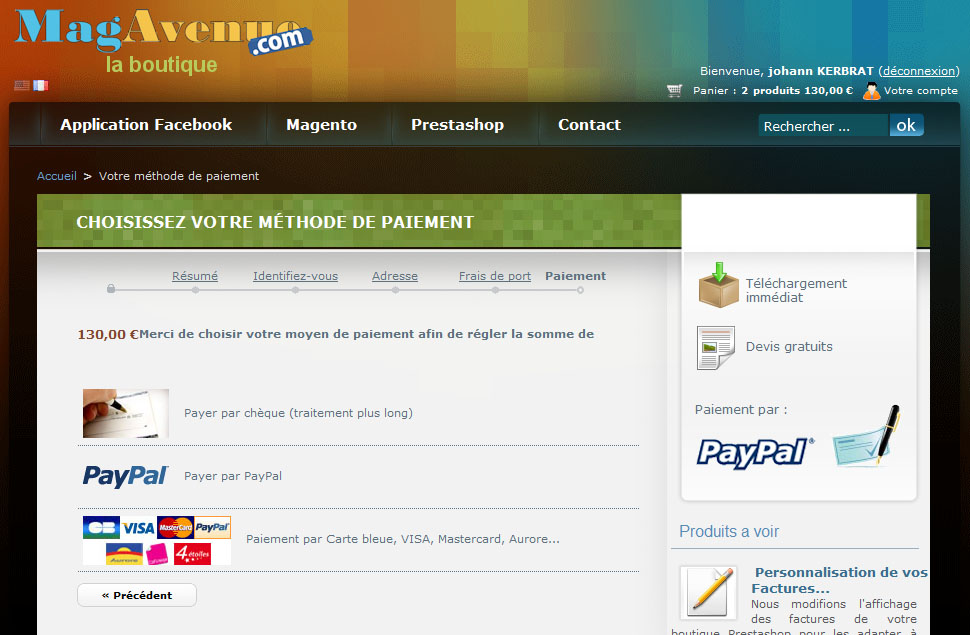
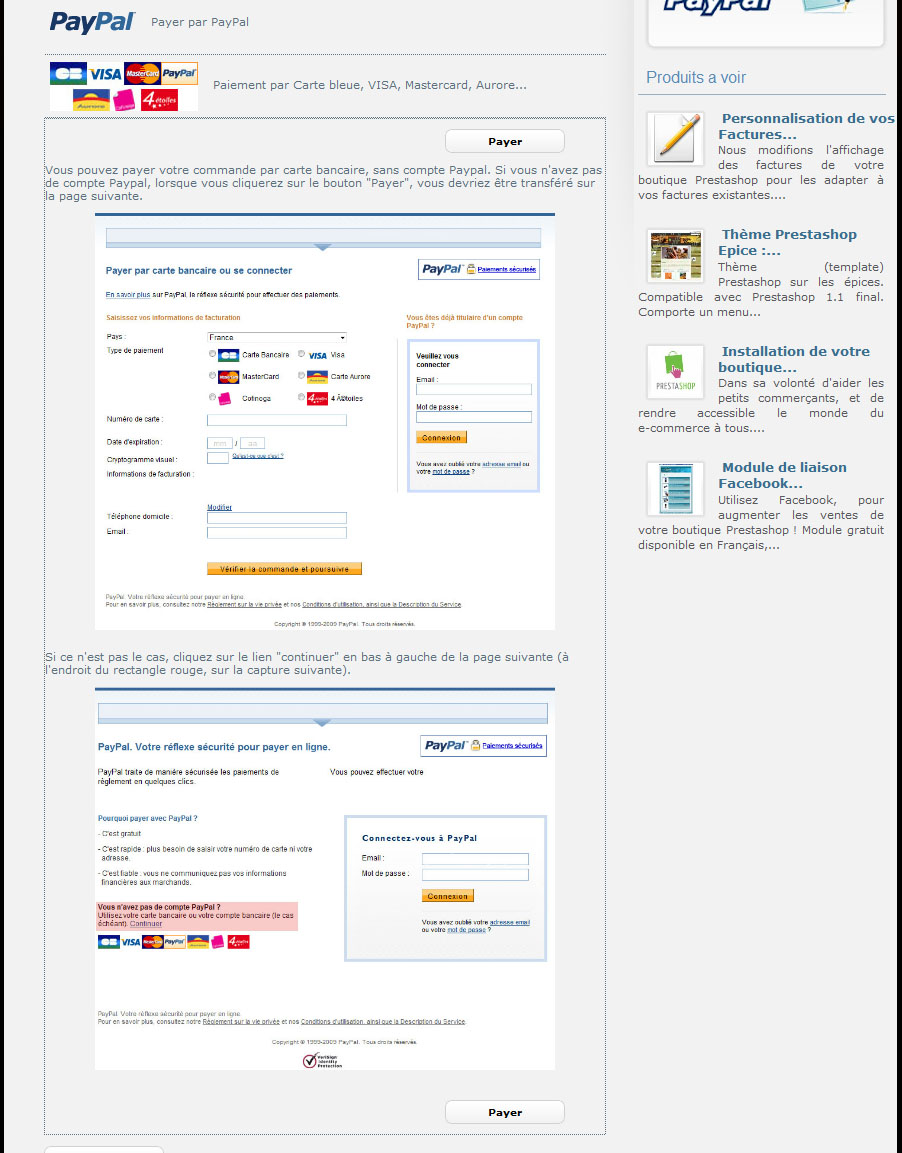
Conscient que les démarches que nous allons décrire ne sont pas toujours simples, le module modifié et traduit est disponible sur notre boutique au prix de 10€ tout compris.
En aucun cas, notre équipe ne pourra être tenu pour responsable si le module que vous allez modifier ne fonctionne plus. Pensez à faire des sauvegardes !
Ajout de l’option « paiement par carte bancaire » au module Paypal
Nous allons modifier l’apparence du module Paypal. Rendez vous donc dans le dossier « modules » de votre installation Prestashop, et ouvrez le fichier Paypal.tpl.
Au début du fichier, vous trouverez une première balise <p></p>. Celle-ci correspond à l’option « Payer avec Paypal ».
Pour en ajouter une seconde, nous allons imiter cette balise.
Ajouter :
</p>
A l’intérieur de cette balise, créez un lien avec une image de votre choix.
<img src= »{$module_template_dir}paypal-cb.jpg » alt= »{l s=’Pay by credit card (Visa, MasterCard, Aurore…)’} » />
{l s=’Pay by credit card (Visa, MasterCard, Aurore…)’ mod=’paypal’}
</a>
Puis à l’intérieur du lien, nous allons créer un appel Javascript, permettant d’afficher l’aide (que nous allons créer par la suite).
Cet appel, utilise le framework Jquery (chargé par défaut dans Prestashop). Lorsque nous cliquerons sur l’option, il affichera avec un effet de transparence, l’aide.
Le #helpPaypal est un identifiant pour la partie aide, vous pouvez le modifier, mais pensez à le noter.
Les parties contenant le code type : « {l s=’texte’} » sont les textes qui seront affichés par le module. Vous pourrez par la suite les traduire dans l’interface d’administration de Prestashop.
Création de l’aide
Nous allons maintenant créer la partie permettant d’afficher l’aide à l’utilisateur.
A la fin du fichier, créez un div, dans lequel vous mettrez l’identifiant précédemment rentré dans l’appel Javascript.
</div>
Pour rendre le div, plus attrayant, nous lui appliquons un style, avec une bordure en « petits points ».
Important : Il faut penser à lui appliquer un style pour que l’aide ne s’affiche pas en permanence.
</div>
A l’intérieur du div nous allons ajouter deux boutons, un en haut et un en bas, permettant de passer au paiement (important!).
C’est l’attribut onClick qui permet de faire cela avec la valeur « javascript:$(‘#paypal_form’).submit(); »
Pour les utilisateurs de Prestashop version 1.3.1 et plus, le bouton doit être sous la forme suivante :
Enfin à l’intérieur du div il ne manque plus qu’à ajouter les images expliquant la procédure ainsi que le texte. Il est important d’expliquer au client, qu’il peut tomber sur une page ne permettant pas de payer par carte bleue et qu’il faut cliquer sur le lien « continuer » en bas à gauche de la page.
Pour cela vous pouvez utiliser les balises <img src= » » alt= » » /> et pour le texte <p>{l s= » mod=’paypal’}</p>.
Traduction des textes du modules
Vous avez ajouté les différentes phrases nécessaires à l’aide et à la nouvelle option. Il ne vous reste plus qu’à les traduire pour que votre module soit disponible en français et dans toutes les autres langues.
Pour cela rendez-vous dans l’administration de Prestashop, puis dans « Outils>Traductions ».
Dans le premier champ, choisissez « modules » puis cliquez sur le drapeau français.
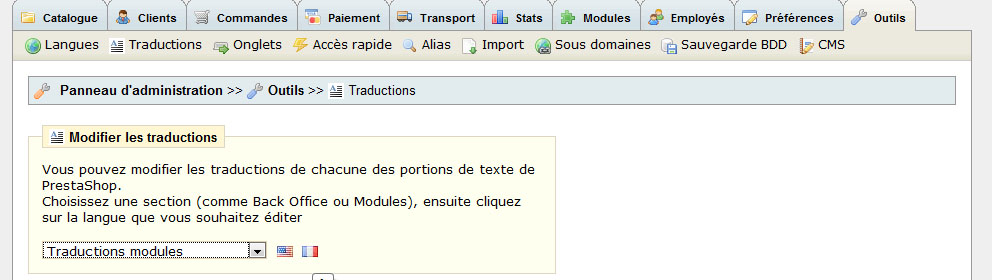
Il ne vous reste plus qu’à trouver le module Paypal et à effectuer les traductions.
Conclusion
Désormais, lorsque vous procédez à un achat, vous devriez obtenir une nouvelle option. Lorsque vous cliquerez une première fois sur celle-ci, une aide devrait s’afficher avec deux boutons permettant de passer au paiement.
Cette modification vous permettra de ne pas perdre les clients n’ayant pas de comptes Paypal, et vous permettra de vous passer d’un module de carte bancaire, au moins dans un premier temps.
Conscient que les démarches que nous avons décris ne sont pas toujours simples, le module modifié et traduit est disponible sur notre boutique au prix de 10€ tout compris.


Bonjour,
tout d’abord, merci pour cette initiative, il est vrai que paypal pousse un peu pour l’ouverture d’un compte chez eux ( c’est un peu fatiguant d’ailleurs).
il n’est précisé nulle part pour quelle version votre module en vente est validé (1.1, 1.2, 1.2.1) ?
merci pour cette précision.
Le module est compatible avec toutes les versions de Prestashop.
En règle générale, en cas de problèmes nous intervenons et modifions le module au cas où !
La page Paypal spécial CB est une bonne page !
Facile, simple et clair : le top.
On peut donc maintenant avoir un site e-commerce sur WordPress sans problème 😉
Bonne journée, gael
Ce module me convient très bien, mais j’ai ce message après avoir installé sur une 1.2.3 :
Fatal error: Smarty error: [in F:\xampplite-win32-1.7.1\xampplite\htdocs\www\prestashop\modules\paypal/paypal.tpl line 8]: syntax error: expecting ‘=’ after attribute name ‘by’ (Smarty_Compiler.class.php, line 1558) in F:\xampplite-win32-1.7.1\xampplite\htdocs\www\prestashop\tools\smarty\Smarty.class.php on line 1095
C’est du à la version 1.2.3 ? Merci
Bonjour Francois,
Non cela ne vient pas de la 1.2.3, nous l’avons testé sous toutes les versions, et n’avons pas de problèmes. Est-ce le module que vous avez pris en boutique ou celui que vous avez fait en suivant le tutoriel ?
Voici un article fort interessant http://paypal.over-blog.net/article-3773523-6.html
Bonjour,
j’est effectue les modifs, lorsque je choisi de payer par cartes, je me retrouve toujours avec la deuxiement fenetre ( besoin de cliquer pour acceder au paiment par carte de credit).
Est ce normal ?
j’ai essaye sur votre boutique je tombe tout le temps aussi sur la deuxiement fenetre.
A aucun endroit dans notre article nous expliquons que nous allons grâce à ces modifications, permettre au client de se rendre sur la seconde page.
En effet cela n’est pas possible (comme expliqué notamment dans l’article que donne Patrick), dû à un problème de cookie.
Le but du module est juste d’afficher une explication pour le client.
Ok autant pour moi.
merci
Bonjour,
Faut-il obligatoirement avoir un comte premier pour utiliser ce module ? Un compte personnel suffit-Il ?
merci
D’après l’aide de Paypal, un compte personnel suffit 😉
https://www.paypal.com/helpscr?cmd=_help&locale=fr_FR&countrycode=FR&_dyncharset=UTF-8&t=solutionTab&ps=solutionPanels&solutionId=162944
super info: je teste totu de suite!
Bonjour, je suis pas très bon en code et j’ai essayé de mettre ceci, mais quand je vais arriver au paiement, ça me met une page vide.
Ca doit être une erreur stupide de ma part, mais j’ai très peu de compétence en code, du coup j’ai essayé d’être le plus fidèle possible aux explications.
Voici ce que j’ai :
{l s=’Pay with PayPal’ mod=’paypal’}
{l s=’Pay by credit card (Visa, MasterCard, Aurore…)’ mod=’paypal’}
{l s=” mod=’paypal’}
Merci d’avance !
Oups, visiblement mon code à été interprété dans le commentaire 😀
Je le met sous forme d’image alors : http://img80.imageshack.us/img80/3811/codeh.jpg
Merci beaucoup !
Peut être un problème de cache.
Ça me le fait dans tout les navigateurs. A mon avis c’est un problème de code, vu que j’ai rien capté à ce que j’ai mis, je me suis contenté de faire des copié collé en essayant tant bien que mal d’être fidèle aux explications…
A la limite je mettrais bien 10 euros dedans, mais le truc c’est que si jamais c’est un autre problème, je dépenserais 10 euros pour rien…
Et puis je suis sûr que ça doit être un truc tout bête, si jamais c’est un problème de code.
Commandez le et envoyez nous par e-mail contact[_at_]magavenue.com, un accès FTP à votre site. Nous vous l’installerons.
Alors sur le principe ça me dérange pas de mettre 10 euros (ça les vaut bien, et si ça peut me faire gagner du temps…) mais à mon avis c’est un truc tout con. Et j’ai pas super envie de donner un accès ftp à n’importe qui :p
Bon j’essaie dans mon coin, et si vraiment j’y arrive pas, je ferais comme ça.
Ok j’ai fini par l’acheter, ça marche !
Au final ça m’aura fait gagner pas mal de temps, aucun regret donc !
Retour de ping : Comment créer, faire connaitre et vendre un eBook ?
Ceci fonctionne-t-il avec la dernière version de Prestashop ?
cela fonctionne techniquement.
par contre, personnellement et paradoxalement, mon taux de transformation a baissé.
l’idée d’expliquer le fonctionnement est bonne, maintenant, je pense qu’ilvaut mieux mettre une petite phrasse juste au dessus du logo paypal et un lien « en savoir plus », plutot que ce modèle qui est un peu déceptif pour l’internaute.
Bonjour,
je cherche à recuperer le logo paypal CB (CB, carte aurore,etc,etc).
Quelqu’un peut il m’aider ?
Precisions: je cherche à changer le logo paypal bleu qui mene à la page de paiement paypal.
Merci
@Florent, oui cela fonctionne avec la dernière version.
@Thomas, pour tirer de telles conclusions, il faudrait je pense, plus de détails. Sur quelle période avez vous constaté la baisse du taux de transformation etc etc. Une telle baisse peut avoir de très nombreux facteurs.
Surtout que normalement, sans le module, vous ne proposez que Paypal. Avec le module, vous proposez un modèle de paiement en plus. Je doute donc que les gens souhaitant payer par Paypal, soient déroutés par ce module.
@caso : vous pouvez toujours le faire vous-même, en assemblant les différentes images.
Bonjour,
Je pensais que le module proposait SYSTEMATIQUEMET la bonne page PAYPAL avec la possibilité de mettre son numéro de carte bancaire etc… lorsque le client demandait à payer par carte bancaire. C’est ça qui aurait été utile.
Le problème en particulier est pour les familles qui n’ont qu’un seul ordinateur. Les enfant connaissent PAYPAL et ont un compte dont les cookies sont présents sur le disque. Les parents eux ne connaissent pas et en ont la trouille. Il faut leur ZAPPER les pages PAYPAL et arriver directement sur la page présentée en jpg…
J’imagine que l’explication doit dissuader ceux qui n’y comprennent déjà rien et ont donc peur de payer sur internet. Je pense effectivement que le taux de transformation doit baisser comme l’ont constaté certains…
Je souhaite trouver un module qui me permette de n’utiliser que PAYPAL mais qui le rende transparent pour les personnes qui veulent payer par carte bancaire. Ce n’est malheureusement pas le cas de ce module.
Si certains connaissent un tel module, je suis prenneuse. Merci.
Paypal ne permet pas de « sauter » ces étapes. C’est aussi une façon pour eux de conserver leur modèle économique.
Tous les internautes ne comprennent pas « déjà rien ». Il faut arrêter les stéréotypes. Si l’internaute se trouve sur votre site, et se trouve à la page de paiement, c’est qu’il comprend déjà pas mal de chose.
Enfin, rassurer un acheteur, n’est pas forcément une perte de temps, surtout quand le procédé de paiement par carte bancaire diffère de celui commun. Car même si vous tombez sur la page de paiement CB de paypal directement, l’interface n’est pas la même que la plupart des interfaces de paiements (paybox, atos, autre).
Malheureusement cette méthode ne fonctionne pas chez moi 🙁 (Version 1.2.5).
Dommage, ça avait l’air sympa comme idée…
Merci quand même.
Nous n’avons pas de problèmes recensés avec notre module sur Prestashop 1.2.5 ou inférieur, et Prestashop 1.3.x.
Peut être une mauvaise manipulation.
Ah peut être, mais j’ai tenté pendant 3 jours et suivi le tutorial à la lettre. Le problème, d’après ce que j’ai constaté avec le tutoriel, est que les caractères spéciaux tels que « ‘ » ne sont pas les mêmes dans le fichiers TXT que dans le tutorial… Peut être que c’est ça qui me cause une erreur 500 🙁
Enfin bon… Merci.
Le tutoriel a été testé, donc pas d’erreurs normalement. Il n’y a par contre pas de fichier txt à remplir mais un fichier php.
Sinon éviter les copier-coller mais réécrivez le code, cela pourrait éviter les erreurs d’encodages.
Sinon vous pouvez toujours essayer le module. S’il ne fonctionne pas, nous le modifierons pour qu’il fonctionne chez vous ou nous vous le rembourserons.
Le fichier « Paypal.tpl » est un ficheir PHP ?
Je pense que je vais essayer le module comme vous dites et on verra si ça fonctionne. Bien sur, je vous fais confiance.
Merci beaucoup.
Tpl excusez moi en effet. Bref pas un fichier texte 😉
Alors juste une dernière question, avec quoi éditez vous le fichier Paypal.tpl ? Moi je l’ai fais avec le bloc note, faut il utiliser un programme en particulier ?
Merci.
Avec n’importe quel éditeur PHP ou autre. L’utilisation du bloc note est tout à fait possible !
Bonjour,
dans la partie « Création de l’aide » vous dites qu’il faut modifier après le « form » …
Mais dans quel fichier ?
j’aurais souhaité regarder dans les commentaires sir cette question n’avait pas déjà été soulevée mais malheureusement ils ne fonctionnent pas chez moi.
En tout cas merci pour vos conseils et modules que je test avec grand plaisir.
Manuel
Toujours dans le même fichier.
Excellent module que j’ai acheté et quelque peu modifié. Je trouvais que la fenêtre qui s’ouvrait suite au clic sur le paiement carte de crédit était un peu trop longue et fastidieuse pour le client. Je vous invite à jeter un coup d’œil sur notre site http://www.hpcalendriers.be (site destiné à la vente de calendriers publicitaires en France, Belgique, Luxembourg et Pays-Bas)
Bonjour,
Je ne meme pas le petit lien a gauche dont vous parlez qd je tombe sur Paypal. Je possède un compte Premier. Est-ce a cause ça ? Faut-il plutot un compte business ?
Merci.
Non le module est aussi compatible avec un compte Premier.
Vous devez autoriser le paiement sans compte Paypal dans les préférences.
Merci pour ce tips ! Excellente idée que je m’empresse d’implémenter.
Juste pour mettre mon grain de sel 🙂 je ferais une remarque sur la méthodologie :
Plutôt que de modifier directement le fichier paypal.tpl dans le dossier du module original, je conseillerai de faire une copie du dossier /modules/paypal dans le dossier /themes/montheme/modules, d’y supprimer les fichiers php, et de faire les modifications que vous proposez dans le fichier /themes/montheme/modules/paypal/paypal.tpl.
Le but de cette manip supplémentaire est de protéger ces modifications d’éventuelles futur mises à jour de Prestashop qui les écraseraient.
Séb.
Tout à fait, c’est une remarque judicieuse. Néanmoins un peu plus longue et un peu plus compliqué selon moi (obligation de régénérer les fichiers de traductions entièrement etc).
Bonjour,
n’est il pas plus simple de mettre un logo paypal avec tous les modes de paiements soit CB, mastercard, 4etoiles… ou en paypal?
Qu’en est il avec la version 1.3.1?
ça fonctionne sur la 1.3.1.1 ? moi ca retourne sur la premier page (order.php) lorsqu’on choisit Paypal. Cela fonctionne sur ma 1.2.5.0 locale par contre.
Oui cela fonctionne avec la 1.3.
Si vous avez utilisé notre module, vous devez prendre la version pour la version 1.3.
Si vous avez fait vous-même le module, il faudrait nous en dire plus. (L’adresse de la boutique…)
Ne fonctionne plus sur la version 1.3.1
Reviens sur order.php
Merci de lire le commentaire juste en dessous du votre.
Question déjà posée. Le module fonctionne bien sur la 1.3.1. Si vous avez achetez notre module, vous devez prendre la version pour Prestashop 1.3.
Si vous l’avez fait vous même, vous avez fait une erreur quelque part.
Bonjour je tourne en 1.2.5
j’ai fait les modif indiqué si dessus mais lors de la phase paiement j’ai une page blanche qui s’ouvre.
les modif sont elle pour 1.2.5 ??
merci pour vos réponses.
Bonjour,
Le module est compatible avec toutes les versions de Prestashop. Vous avez sûrement dû faire une erreur quelque part…
Hop hop, j’ai rien dis, j’avais coché la case Mode Sandbox dans Prestashop, qui me redirigeait donc vers cette page 😉
Bonjour,
J ai refait tout le tuto sans probleme,
Mais quand je clique sur le bouton « payer » rien ne se passe.
A mon avis le probleme viens du form, quand vous dite « écrire le div de l aide Juste avant la balise “form” »
Mais ou est le form ?
Le tutoriel vient d’être mis à jour.
bonjour
le module n’est pas gratuit dans la nouvelle version prestashop??
Il me semble l’avoir vu ..
Vous devez parler de PayPal Intégral Evolution. Ce qui est complétement différent.
Bonjour,
faut il un serveur qui accepte le SSL ? (https )
ou cela marche t’il sur un serveur « normal »
merci d’avance
Bonsoir,
et qu’en est il de la version 1.4 de prestashop?
Pouvez-vous m’aider svp.
Bonjour,
Est-ce que ceci fonctionne avec le module PayPalAPI v1.0 ?
Cordialement,
Jean-Marie BRUN.
@fernandes : Non ce n’est pas obligatoire.
@Marie : C’est compatible avec Prestashop 1.4
@Jean-Marie Brun : La modification pourrait fonctionner oui.
Bonsoir,
« La modification pourrait fonctionner » ou bien la modification fonctionnera ?
Cordialement,
Le module n’est pas le même donc il faudra adapter nos instructions pour le module PaypalAPI.
bonjour
avec ceux module paiements par carte bancaire sans compte Paypal
y a t’il toujour la commision de prise pas paypal ?
Bonjour,
je vous trouve votre tuto super utile mais j’ai une erreur object object sur mon code javascript quand je selectionne mon nouveau mode de paiment. Auriez vous une piste ?
Merci pour votre réponse et merci pour les ressources que vous partagées.
Cordialement,
Micke
Merci pour cette contribution et le partage, c’est tout a votre honneur.
Tuto super utile
Bonjour,
Cela fonctionne parfaitement sur ma boutique Prestashop.
Mais je gère aussi une boutique sous Magento et je ne trouve pas comment faire la même chose avec Magento. Si vous avez une idée je suis preneur.
Bonjour je ne trouve pas le module paypal.tpl ou ce trouve t’il pourriez vous m’indiquer le chemin svp
Pareil que cauchie, je ne trouve pas le paypal.tpl
Le module paypal a-t-il évolué ?
bonjour:
j’aimerai savoir si nous restons totalement sur la page du site? ou si une fois inscrit les données bancaires, nous sommes redirigé vers paypal??
merci
Bonjour,
je souhaiterai faire moi mm les modifs sur paypal mais j’avoue etre novice
et je ne trouve pas « les balise »
j »ai ouvert mon modul paypal mais apres je ne sais pas ou aller.
Merci d’avance