
Vous avez fini d’installer votre boutique Prestashop et avez commencé à l’utiliser. Pour rendre totalement opérationnel celle-ci vous allez devoir remplir votre catalogue produits.
Pour cela 2 solutions s’offrent à vous :
- Vous pouvez lire notre précédent article sur l’ajout de produit dans votre boutique Prestashop. Mais ajouter les produits un par un peut prendre du temps.
- Utiliser une fonction intéressante de Prestashop qui permet d’importer dans votre catalogue produits, plusieurs articles à la fois (voire même des centaines) grâce à un tableau CSV.
Pour exécuter cette opération, vous n’avez qu’à utiliser un tableur, comme Microsoft Excel ou Open Office Calc (qui est gratuit).
Ce tableau doit avoir les titres de colonnes sur la 1ère ligne et la description de chaque produit sur les suivantes. Vous pouvez télécharger ce fichier d’exemple (clique droit et enregistrer sous), et le compléter pour chacun de vos produits.
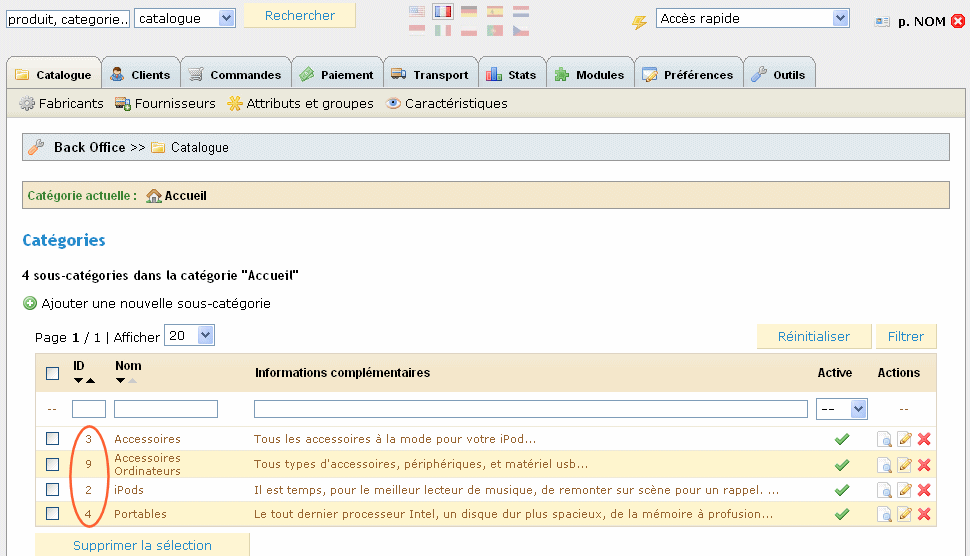
La dernière colonne : Catégorie, doit indiquer l’ID de la catégorie dans laquelle vous souhaitez ajouter le produit. Vous pourrez trouver cet ID dans le catalogue de la partie administrateur de votre magasin. A gauche de chaque nom de catégorie se situe cet identifiant.
Exemple sur la photo à droite si vous souhaitez ajouter un produit dans la catégorie : Ipods vous devrez saisir 2 (Si c’est dans la catégorie mère « Accueil » l’ID est de 1).
Le seul inconvénient de cet outil est que vous devrez remplir manuellement par la suite certaines informations : comme les photos ou les taxes. Par exemple vous ne pouvez rentrer que le prix de vente HT (la taxe sera par défaut à 19,6%). Vous devrez donc après l’import des produits, les compléter un par un.
Mais l’importation des produits par un fichier CSV reste quand même un gain de temps non négligeable. Il vous permet aussi, si vous utilisez un autre logiciel pour gérer votre boutique en ligne, d’exporter votre catalogue produit à partir de celui-ci et de le réimporter dans Prestashop.
Cliquez pour lire la vidéo (pour la regarder en plein écran, cliquez sur les 4 flèches en haut à droite et ensuite sur le bouton Menu)
Miroir : https://blip.tv/file/1022244


Bonjour, merci pour ce tuto vidéo fort utile, j’ai l’intention de créer une société de création de site eCommerce utilisant PrestaShop et votre site arrive à point, merci 🙂
quel intérêt de pouvoir importer en lot s’il faut tout se retapper à la main pour ajouter les photos ?
En plus prestashop renomme les photos, ça ne facilite rien.
Franchement, prestashop est beau, mais c’est très loin d’être au point pour être utilisé en production sur un gros site.
En effet le fait que l’on ne puisse pas importer les photos n’est pas une bonne chose…
Pour votre avis, tout dépend de ce que vous appelez « un gros site »
Je suis en train de faire « un gros site » qui comporte 4000 articles.
Prestashop a repris la base d’oscommerce et l’a en général amélioré, mais ils ont complètement saccagé la base et les tables. Le fait de séparer les articles entre plusieurs tables est une chose incompréhensible !
Je réfléchis à mon choix de solutions techniques pour ma boutique en ligne…
Je suis dans le même cas que Romain, je vais travailler avec un nombre d’articles qui se comptent en milliers. Et cela elimine beaucoup de solutions.
Romain, pourrais tu détaillé ton avis ? Prestashop devient bloquant pour un grand nombre de produits ? compliqué pour la partie technique ? compliqué pour l’utilisateur du backoffice ?
Quelqu’un d’autres a t-il implémenté des sites de ce type sur Prestashop ? Magento ? autres ?
Merci d’avance.
Jérôme
http://mets-idees.fr
Bonjour Jérome,
Prestashop n’est pas un système ne pouvant pas gérer des milliers d’articles ! Il en est tout à fait capable !
Le problème actuel est que l’import excel ne gère pas toutes les options d’un produit, il faut donc modifier le code de cet import.
Mais de toutes les manières si vous avez un catalogue contenant des milliers de produits, vous aurez de fortes chances, d’avoir besoin de modifier aussi cet import, afin que votre catalogue soit compatible avec.
Le choix d’un système ne dépends pas seulement du nombre d’articles. Même si nous irions plutôt conseiller une installation Magento pour les grosses boutiques, la complexité du système est un gros désavantage comparé à d’autres solutions comme Prestashop.
En bref, entre les deux systèmes, testez les, faites vous une idée d’eux, regarder comment les modifier si vous souhaitez changer le thème etc, regarder le temps et la facilité que vous mettez à gérer une commande dans la partie administration…
C’est l’utilisation que vous ferez de votre logiciel tous les jours qui doit définir lequel utiliser !
Merci pour la célérité de la réponse. Effectivement, l’utilisation et le test sont les meilleures méthodes lorsque cela est possible. En l’occurence, nous n’avons pas encore référencé nos articles, et nous ne pouvons les référencer sur un test. Nous sommes obligés de prendre un échantillon, ce qui peut biaiser les tests. C’est pour cela que j’apprécie toujours l’avis d’autres utilisateurs.
Je vais m’installer Prestashop.. à suivre.
Jérôme
http://mets-idees.fr
bonjour
avant un crash de mon disque dur, j’avais sauvegardé une info concernant un plug-in développé par un user de prestashop, pour pouvoir importer en xls ou csv les autres critères/champs caractéristiques des produits qui ne sont pas compris dans les fichiers d’import standard…j’avais trouvé cela sur un forum prestashop; donc on doit pouvoir le retrouver;
Bonjour gg,
Si vous le retrouvez, pensez à y mettre le lien ici, cela pourrait être utile à d’autres !
ommage qu’on peut pas integrer les photos
Bonjour,
Les Champs disponibles lors de l’importation du fichier .csv ne sont pas les mêmes que dans votre vidéo.
Il manque le prix, la référence, le poid et la quantitée…
Par contre il y a toute c’est catégorie :
Identifiant
Actif (0/1)
Nom *
Catégorie parente
Description
Balise
Meta mots-clefs
Meta description
URL simplifiée
URL de l’image
J’imagine que cela est due à la version 1.1
Mais est t’il possible de rajouter des champs ?
Merci
Nico
De plus, lorsque je choisis les colonnes, et que je veux confirmer, il me dit ceci ; » Tentative de piratage »
???
Je travaille sur un projet pas en ligne.
@Nico,
Vous ne pouvez pas rajouter des champs simplement par rapport à ceux listés ci-dessous.
Pour le .csv, vous devez le refaire en fonction des champs listés.
Pour la tentative de piratage, cela semble bizarre. Peut être dû à une erreur de token.
bonjour je suis a tester prestashop quand jai vue votre question apres recherche voici seque jai trouver
esperant vous aider ( description )
Suite bureautique complète, en français, équivalent à la suite Microsof Office, et comprenant : traitement de texte, tableur, dessin vectoriel, PréAO type powerpoint, base de données, création html…… compatible 100 % avec Word. Souvent meilleure que Word (ex: pour insérer des images ou dessins vectoriels !) avec un format standard de fichiers en xml.
si ont peut cree un fichier complet avec les image
en .xml et apres le convertir en fichier xls ou csv
avec se prg la http://www.rustemsoft.com/XMLConverter.asp ou autre
ou juste incorporer le .xml au prestashop 🙂
en tk jespere vous avoir aide un peu
merci a bientot
Je suppose que la suite dont vous parler est OpenOffice ?
Sinon, je n’arrive pas trop à voir l’aboutissement de votre démarche. Quel intérêt de créer un fichier xml pour le convertir en xls ?
re ben pcq le prestashop acepte pas le xml donc faut le convertir ou bien mettre le xml en fonction sur le prestashop en esperant que le fichier xml et cvs acepte les photo converti par le fichier xml
Je pense que tu n’as pas tout compris à l’informatique.
Salut
Je vois que je ne suis pas le seul à me taper la tete dans le mur.
Pour l’import images, j’ai essayé mille et une solution, arpenté le net et les forums
Et j’en suis arrivé à la conclusion, qu’il n’y a pas de solution. A moins de modifier le bug de PS mais ca je sais pas faire. Ou encore un sauveur qui pourrait créer un module d’import du tonner.
Amitiés
Pour l’import images, il n’y a certes pas beaucoup de solutions « simples ». Néanmoins vous pouvez le faire en requêtes SQL. Mais cela est réservé aux utilisateurs avertis !
bonjour,
comment remplir le fichier excel lorsque les articles ont des sous-références : j’aimerai vendre du pret a porter et donc pour un article j’ai plusieurs tailles
pouvez vous m’indiquer la facon de proceder
merci
En utilisant les caractéristiques ?
L’import des images est tout à fait possible et pas très compliqué, pour un développeur en tout cas.
Je l’ai fais en quelques heures.
Bravo antouane.
Maintenant essayez d’imaginer, que les lecteurs de ce billet sont débutant.
Et imaginer que quelques heures pour vous, équivaudra à plusieurs jours pour un débutant…
Et maintenant comprenez que votre commentaire est hors-sujet.
Le billet n’est pas un lieu où chaque développeur démontre ses compétences… (et à ce moment là plusieurs heures, c’est long…).
Merci pour le tuto ! Très utile !
Bonjour,
Je voulais savoir comment faire pour importer des données d’un autre site autre que l’image du produit.
Exemple : je voudrais récupérer les informations suivantes d’un autre site :
Quantité disponible
La documentation technique
L’image du produit (chose faite grâce à l’importation prestashop).
Merci pour votre aide.
bonjour,
J’ai 2 catégories principale avec des sous catégories donc les noms sont identiques,
Dans la première catégories les produits sont déjà présent.Voila je souhaiterais importer mes autres produits dans la deuxième catégories, mais je sais pas comment faire, merci d’avance pour votre aide.
Cordialement